
Notification Sounds
Moss can play a different sound for each kind of notification, so you can tell at a glance — or by ear — whether something needs your attention now or later.
Open Moss Settings (the gear icon in the left sidebar) and click the Notifications tab to configure them.
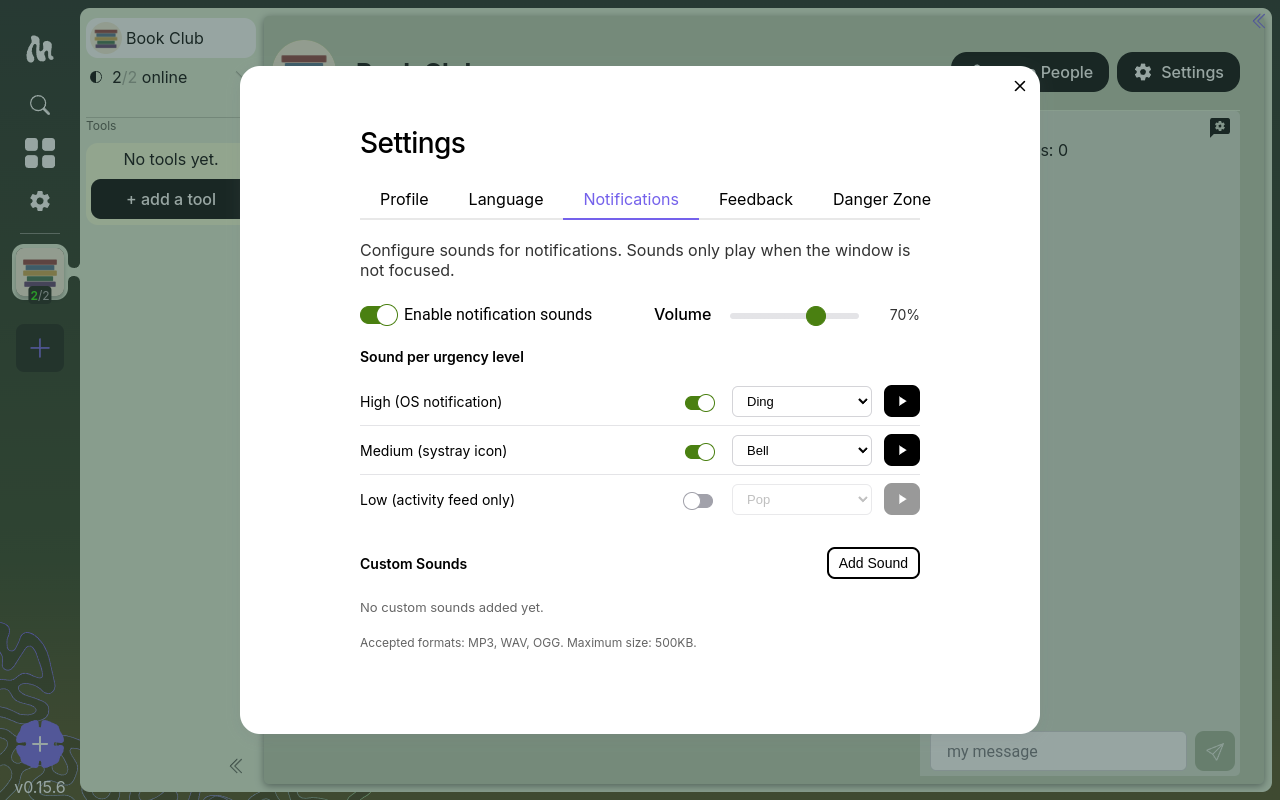
What you can change
- Enable notification sounds — a master switch. Turn it off and Moss stays quiet, regardless of the rest of the settings here.
- Volume — a single slider, 0 to 100, applied to every sound Moss plays.
- Per-urgency settings — three urgency levels, each with its own toggle, sound picker, and a play button to preview the sound.
- Custom sounds — upload your own.
Moss only plays a notification sound when its window isn't focused. If you're already looking at Moss, it stays quiet.
The three urgency levels
Every notification Moss raises has an urgency, set by the tool that raised it. The level decides where the notification shows up — and which of your configured sounds plays.
- High — surfaces as an OS desktop notification (the system-level pop-up). For things that probably can't wait.
- Medium — shows in your system tray icon. For "good to know soon."
- Low — only appears in Moss's activity feed. For background-level activity you can catch up on later.
By default, High is set to Ding, Medium to Bell, and Low to Pop with its sound turned off.
Built-in sounds
Moss ships with a small set: None (silent), Chime, Bell, Pop, and Ding. Pick one per level from the dropdown next to it, and use the play button to hear it before committing.
Custom sounds
Want your own? Click Add Sound in the Custom Sounds section to pick a file from your computer.
- Formats: MP3, WAV, OGG
- Maximum size: 500 KB
The file name (minus the extension) becomes the sound's label in the picker. Custom sounds appear in the dropdowns for every urgency level. You can remove them later from the same panel.
Scope
These settings are global to your Moss installation and personal to you — they apply across every group and every tool, and live on your device. Other group members have their own.